How to Set Up a Home Office in a Small Bedroom: 6 Simple, Essential Steps
💡 Affiliate Disclosure: PetchCrea is reader-supported. When you buy through links on our site, we may earn an affiliate commission at no additional cost to you. As an Amazon Associate, I earn from qualifying purchases. We only recommend products that genuinely help you optimize and organize your space.
To set up a home office in a small bedroom, choose a spot that accommodates both your work surface and the chair in use—not just a desk pushed against a wall. Check that you can still reach the bed, open storage, and move through the room, then give your work essentials a defined place to go at night. This guide covers bedrooms with a spare wall, a tight bedside area, an underused closet, or room only for a temporary workstation, including rental-friendly options.
Quick takeaway: Plan for the room while you are working and after you finish. A usable setup needs a suitable work surface, chair clearance, access to power, and somewhere to put work equipment away.
Start by identifying your setup
Before browsing desks, decide which constraint matters most in your bedroom:
- You have an unused stretch of wall. A freestanding desk may work, provided the chair does not block a walkway.
- The only opening is beside the bed. A desk might replace a nightstand, but bedside access and work comfort both need checking.
- You have an underused closet. It may hold a workstation if clothing can move elsewhere and the opening allows comfortable seating.
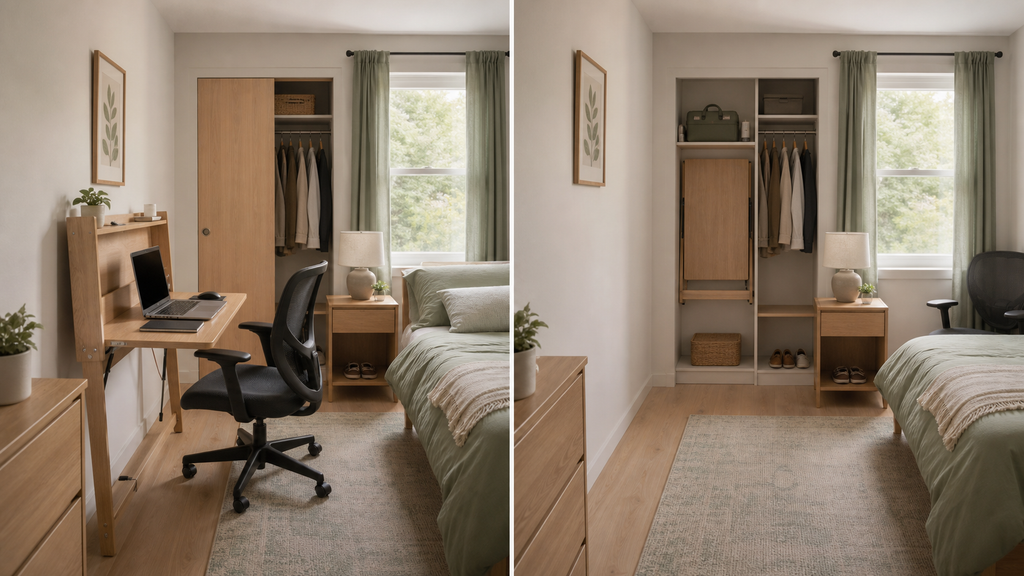
- You need the floor clear outside working hours. A folding desk or wall-mounted fold-down surface could suit occasional work.
- You rent or cannot drill. Start with freestanding furniture. Wall-mounted furniture needs suitable fixings and permission where required.
Your equipment matters just as much as the layout. A laptop used for short administrative tasks needs a different surface from a workstation with a separate keyboard, mouse, monitor, and paperwork.
List what must stay within reach during work. Anything used less often can live elsewhere rather than determining the size of your desk.
Measure before you buy
Measure your own space first; a product described as “compact” may still be too deep for the available wall or too shallow for your equipment.
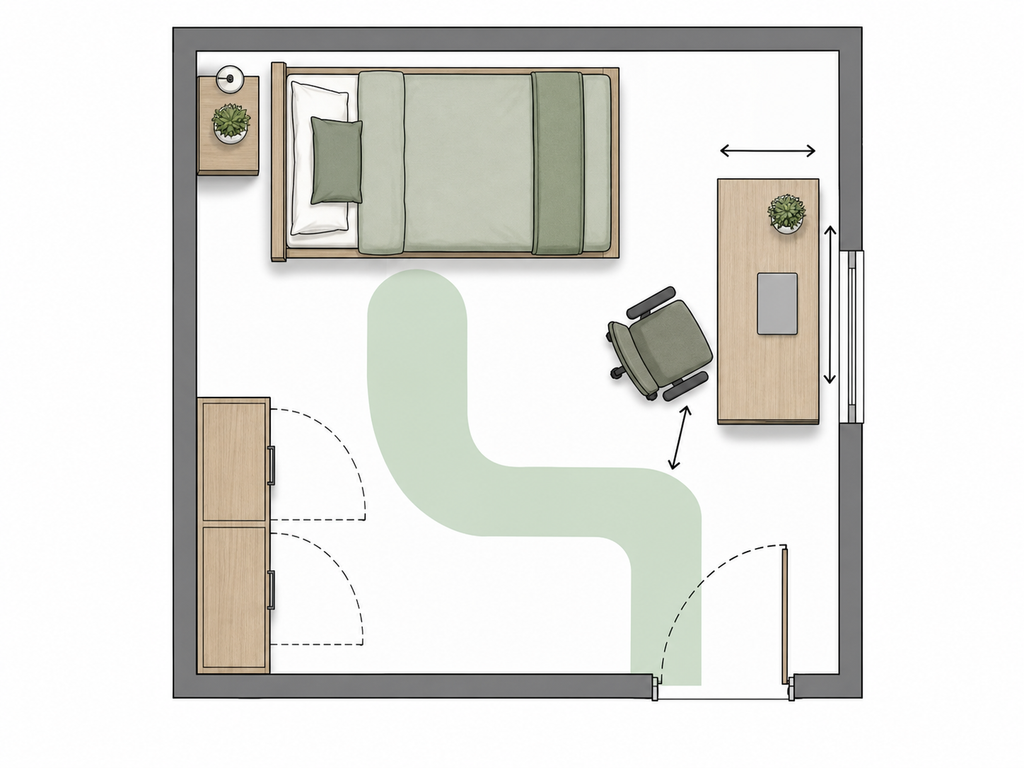
Record these measurements and checks:
- Available width: Measure between actual obstructions, including trim, radiators, and furniture—not simply between walls.
- Usable depth: Mark how far the desk can project without interfering with the bed or circulation.
- Chair space: Allow for sitting, pulling the chair back, standing up, and tucking it away. Include armrests and the chair base.
- Door and drawer movement: Open the bedroom door, closet doors, and nearby drawers fully.
- Legroom: Check the opening beneath the desktop. Drawers, supports, and storage units can reduce usable space.
- Equipment footprint: Include the monitor base, keyboard, mouse movement, laptop, and cable connections.
- Vertical restrictions: Note windowsills, sloped ceilings, shelves, and anything above the proposed screen.
- Power access: Identify outlets and a cable route that does not cross a walking path.
Use removable tape, if suitable for your floor finish, to outline the proposed desk. Put a chair inside the layout and rehearse sitting down, getting up, and walking past it.
Keep access to windows, heating equipment, vents, and any emergency exit route unobstructed. Follow applicable safety and installation requirements rather than treating these areas as spare storage space.
Choose the right solution for your setup
Start with the layout that demands the fewest daily compromises.
If you work in the bedroom most days, a permanent workstation usually involves less setup and packing away. If you use it only occasionally, a folding option may be worth the inconvenience of clearing the surface.
When two layouts seem possible, compare them with the chair pulled out. The desk that looks smaller in a photograph may create the more awkward room.
If you’re still deciding what could work in your room, explore these small home office ideas with your measurements in hand.

- Expansive Workspace for Maximum Productivity: Upgrade your work setup with a spacious 40″ x 24″ dual-panel desktop—light…
- Silent & Seamless Height Adjustments: Switch between sitting and standing effortlessly with a near-silent motor (under 5…
- Smart Memory Presets for Instant Comfort: Personalize your workspace with 3 programmable height settings using the intui…
1. Use a freestanding desk along an unused wall
Problem it solves: You need a dedicated work surface without altering the room.
This is a good fit when a wall has enough uninterrupted space and the seated position leaves essential routes open. A freestanding desk is also easier to move if the first arrangement proves uncomfortable.
Measure and check: Verify overall depth, usable desktop area, under-desk clearance, and the chair’s position during work. Check whether the back of the desk allows plugs and cables to pass without being crushed against the wall.
Limitations: A narrow console is not automatically a suitable desk. Decorative rails, low drawers, or limited depth may prevent comfortable seating or leave the screen too close.
Setup tip: Arrange your actual equipment on an existing table before buying. Use that arrangement to establish the surface area you need, rather than shrinking your work habits to fit the smallest available desk.
2. Replace a nightstand with a bedside desk
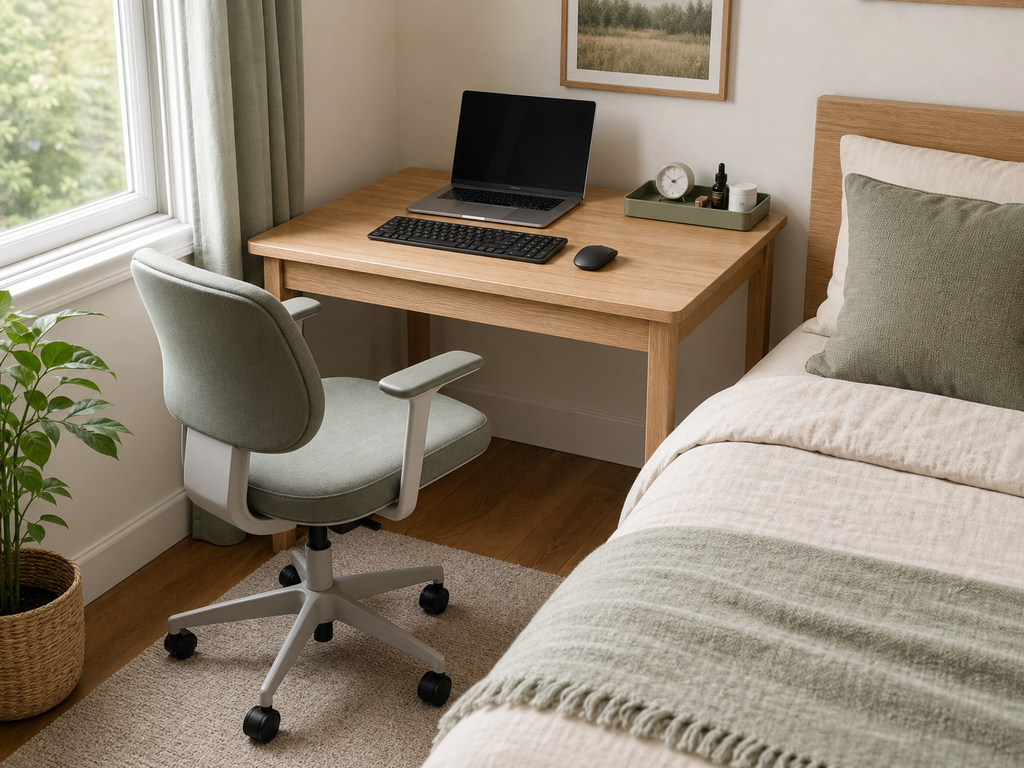
Problem it solves: There is no separate desk area, but one piece of bedside furniture can do two jobs.
This can work when the bed has an accessible side and the desk will not interfere with getting in and out. It is less suitable if work equipment would crowd a shared bedside area.
Measure and check: Check bedside access, the chair’s pullback space, and the desk height relative to your seated position. Also test whether you can reach your bedside essentials from the bed.
Limitations: The comfortable height for typing may not be convenient for a bedside table. Drinks, charging cables, and work equipment can also compete for the same small surface.
Setup tip: Keep bedside items on a small tray separate from the keyboard and mouse. Move the tray as one unit when you begin work, and store work equipment before returning it at night.
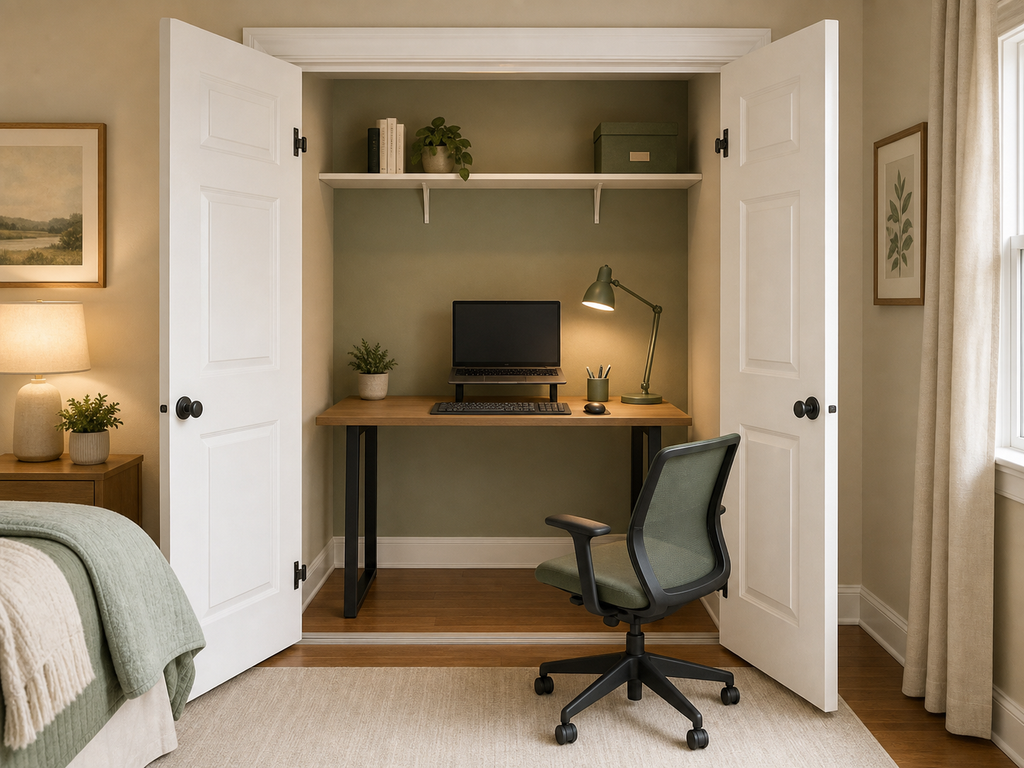
3. Turn an underused closet into a workstation
Problem it solves: You want to contain the office within an existing recess and, where doors allow, hide it after work.
This works best when the closet is genuinely spare—not when its contents will become clutter elsewhere in the bedroom.
Measure and check: Measure the clear opening as well as the interior. Check door tracks, hinges, side returns, legroom, lighting, power access, and the space needed for the chair outside the closet. Confirm where the chair will go when the doors close.
Limitations: A closet can look spacious while offering an awkward seated position. Built-in shelves may not be suitable as work surfaces, and fixed installations require appropriate support. Do not improvise concealed electrical wiring.
Setup tip: Trial a freestanding surface before committing to a built-in desk. Work there with the doors fully open and check whether the lighting, screen placement, and seated position are practical.
4. Choose a folding desk for occasional work
Problem it solves: You need the floor area back when the workday ends.
A freestanding folding desk can suit renters or people with a small amount of equipment. A wall-mounted fold-down desk may suit a room where a permanent desk would obstruct movement.
Measure and check: For either type, check the open dimensions, legroom, stability, and manufacturer’s load limits. For a folding desk, measure the storage location too. For a wall-mounted version, check wall construction, fixing requirements, and permission to install it.
Limitations: The surface must usually be cleared before folding. A separate monitor, multiple cables, or substantial paperwork can make the daily routine cumbersome. Wall-mounted does not necessarily mean rental-friendly.
Setup tip: Keep portable equipment in one nearby container. Before purchasing, rehearse where the laptop, keyboard, charger, and chair will go when the desk is closed.
Compare the main desk options
| Solution | Best for | Space needed / clearance to verify | Installation level | Rental-friendly? | Main limitation |
|---|---|---|---|---|---|
| Freestanding desk | Regular work with a dedicated surface | Desktop footprint, chair pullback, walking route | Assembly may be needed | Usually; check any anchoring requirements | Occupies floor space continuously |
| Bedside desk | Replacing an existing nightstand | Bed access, seated position, nearby drawers | Assembly may be needed | Usually; check any anchoring requirements | Work and bedside items share space |
| Closet workstation | An underused closet with a suitable opening | Interior depth, door opening, legroom, chair storage | Low for freestanding; higher for built-in | Depends on alterations | Displaces existing storage |
| Freestanding folding desk | Occasional laptop work | Open footprint and folded storage space | Usually low; varies by product | Generally, without alterations | Requires clearing and packing away |
| Wall-mounted fold-down desk | A workstation that must close flat | Open projection, fixing locations, legroom | Wall installation required | Only with permission where needed | Wall suitability and load limits |
Add storage without taking away working space
Once the desk and chair fit, choose storage for the items on your essentials list. Do not buy a matching storage set simply because it is available.
Keep daily supplies in one small organizer
A shallow tray or compact desktop organizer suits a few pens, notes, and frequently used accessories.
Check its footprint with the keyboard and mouse in position. Tall or deep organizers can consume the very area you need for working.
Setup tip: Remove duplicates and infrequently used supplies before choosing the organizer. Storage should fit what remains.
Use vertical storage only where it helps
A shelf can hold occasional-use items when floor space is limited. It is a better fit beside the workstation than directly where you might bump your head or obstruct the screen.
Check wall suitability, fixing requirements, reach, and manufacturer load limits. Freestanding shelving may also require anchoring; do not assume it avoids all installation.
Setup tip: Position storage around your working posture, not the other way around. Avoid making yourself lean or twist repeatedly for everyday items.

- 【Important Installation Tip】For sheet‑rock/dry‑wall surfaces, fasten both mounting brackets firmly onto internal wall‑st…
- 【Sleek & Space-Saving Design】Folds flat against the wall to just 1.38″ thin, transforming into a seamless wooden panel t…
- ★ PERFECT FOR SMALL SPACES – This wall mounted folding table wall mounted can fit where you need, it is a perfect additi…
Use portable storage for a desk that disappears
A handled box or small caddy can hold a folding workstation’s accessories. It works when you have a nearby shelf or closet space where the container can live.
Check the largest item before buying, and avoid tightly enclosing equipment while it is running or still needs to cool.
Setup tip: Leave room for easy packing. A container that requires careful rearranging every evening is unlikely to stay convenient.
Make the workstation comfortable and easy to close down
Set the chair and work surface so you can sit with relaxed shoulders, reach the keyboard without stretching, and support your feet. If an adjustable chair needs to be raised, check whether a suitable footrest would help.
For extended laptop use, raising the screen may require a separate keyboard and mouse. Check that the desk can accommodate all three before buying a stand. PetchCrea’s laptop stand vs. monitor stand comparison is a natural next step when choosing that accessory.
Check the screen at the time of day you normally work. Reflections, changing daylight, and a poorly placed lamp can make an otherwise sensible location frustrating. Adjustable window coverings or a repositioned task light may help without moving the desk.
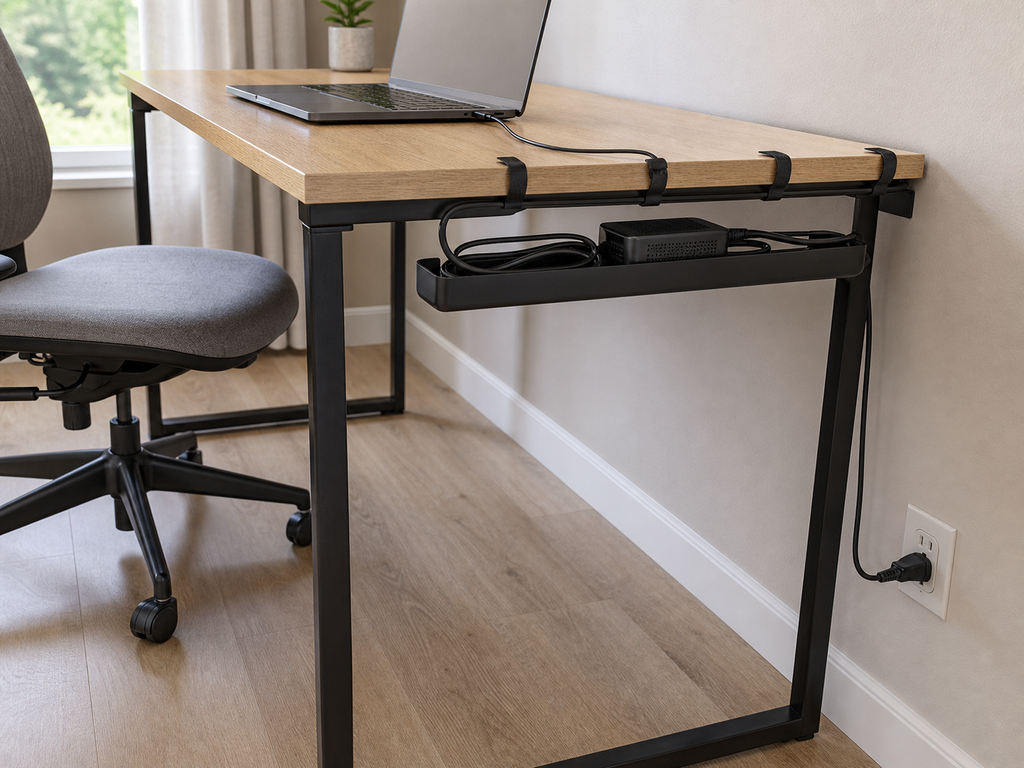
Route cables away from feet, chair wheels, and moving furniture. Follow electrical-product instructions, avoid daisy-chaining power strips, and do not run cords beneath rugs. For the finishing details, use these desk cable management ideas.
Common mistakes to avoid
- Planning around a tucked-in chair. Test the workstation with someone sitting in it.
- Buying a desk before checking equipment depth. A monitor base and keyboard can leave little usable space.
- Filling the knee area with drawers or bins. Storage should not force an awkward seated position.
- Moving clutter instead of resolving it. A closet office only helps if displaced clothes have a realistic home.
- Choosing furniture that requires an elaborate nightly reset. Match the packing routine to the amount of equipment you use.
- Treating the bed as a routine desk chair. Check that your main setup supports a sustainable working position.
A step-by-step plan you can follow today
- Write down your essential equipment. Separate daily items from occasional supplies.
- Choose two possible locations. Reject any that obstruct doors, necessary access, or safety clearances.
- Measure both layouts. Include the chair in use and nearby furniture openings.
- Mock up the better option. Use an existing surface where possible and test your actual equipment.
- Select the desk before storage. Preserve working space and legroom first.
- Create a shutdown routine. Give loose supplies, portable equipment, and the chair a clear destination.
FAQ
Can two people share a small-bedroom office?
Sharing one workstation at different times is often more manageable than fitting two desks. Check that the chair, screen, and input devices can be adjusted for each person. Separate supply containers can make changeovers simpler.
What should I do if the bedroom has very few outlets?
Plan the workstation near a suitable existing outlet where possible. A power strip does not increase an outlet’s electrical capacity. If safe power access requires alterations or you are unsure about the installation, consult a qualified electrician.
How can I handle video calls without rearranging the bedroom?
Check the camera view before settling on the desk position. A plain wall behind you can simplify the background, but do not sacrifice access or comfort for it. Background blur may be a less space-consuming choice than a physical divider.
Does a small bedroom need an office partition?
Not necessarily. A divider adds another footprint and may interfere with light or movement. Start by clearing the work surface after use and keeping work supplies out of sight. Consider a divider only if it addresses a specific privacy need and fits safely.
Where should a printer go?
If printing is occasional, it may not need to occupy the desk. Check the manufacturer’s requirements for ventilation, paper trays, cable access, and opening covers before placing it on another suitable surface. Measure it in use, not just with every tray closed.
Keep the room usable after work
A successful bedroom office leaves room for both activities. Choose the layout that preserves access, supports your equipment, and is easy to put away or tidy. Test the footprint first; then buy only the desk, storage, and accessories that solve a clear problem.